
ARMSX3 PS3 Emulator Latest Version For Android Download

NATIVE ARM PlayStation 3 emulation.
ARMSX3 is a free and open-source PlayStation 3 emulator for Android and ARM devices. It brings PS3 games to mobile with Vulkan GPU rendering, SGSR and FSR upscaling, and controller support. Built upon ARM64-related improvements from RPCS3, ARMSX3 enables PS3 emulation on compatible Android devices.
What Is ARMSX3?
ArmSX3 is an open-source and free emulator for the PS3 on Android platform which is essentially a proof of concept port of RPCS3, which has been around as a PC version of the PS3 emulator for some time. This software is made by the creators of ARMSX2, the PS2 emulator for ARM devices and incorporates advanced Arm64-specific optimizations developed under the RPCS3 project.
Unlike other PS3 emulators available on Android such as aPS3e and RPCSX-UI, ArmSX3 is directly linked to the core codebase of RPCS3. This allows it to benefit from the new updates, fixes, and improvements introduced for the desktop version of RPCS3.
However, ArmSX3 is currently in the early stages of development. The developers describe it merely as a proof-of-concept, so it is not yet a fully functional emulator. At this stage, many PS3 games may not run correctly or may not be playable.
If you are looking for a new PS3 emulator for Android, ArmSX3 is a project worth trying. It stands out because it is largely based on RPCS3 and is being developed by individuals who are working on PS3 emulation.
ARMSX3 Compatibility List
| Game Title | Game Status |
|---|---|
| Skate 3 | ✅ Playable & Tested |
| Sonic ’06 | ⚠️ Improved |
| Tales of Symphonia | ⚠️ Improved |
| BLEACH | ⚠️ Improved |
| Ratchet & Clank Future | ⚠️ Improved |
| Borderlands 2 | ⚠️ Improved |
| Assassin’s Creed | ⚠️ Improved |
| Iron Man 2 | ⚠️ Improved |
| Tales of Xillia 1 & 2 | ⚠️ Improved |
| Spider-Man: Edge of Time | ⚠️ Improved |
| Prototype | ⚠️ Improved |
ARMSX3 Main Features
Built on RPCS3’s Latest Arm64 Improvements
ARMSX3 is an emulator that was not created from scratch. Rather, it leverages the advanced Arm enhancements from RPCS3, allowing the performance improvements and increased compatibility achieved by RPCS3 on the desktop to be ported to Android.
Native Android Platform Layer
The goal of this project is not merely to compile RPCS3 for Android, but to elevate Android to the status of a first-class platform. This entails integration with Android’s native input handling, audio, and system APIs, as well as the provision of a graphics backend optimized for mobile devices rather than a simple desktop port.
Arm64-Focused Optimizations
This emulator is specially designed for arm64-v8a devices, focusing on minimizing desktop-related dependencies that typically hinder the mobile portability speed.
GPU Rendering Support
ArmSX3 uses Vulkan for graphics rendering. It works with modern ARM GPUs, including Adreno and Mali, to deliver better performance and smoother PS3 emulation on supported Android devices.
Controller Support
According to initial testing by developers, Physical controllers that connect using either Bluetooth or USB. It also offers on-screen touch controls, giving you different ways to play PS3 games on Android.
Open Source Development
ARMSX3 is open-source, and its code is available on GitHub under the ARMSX2 organization. You can check updates, view changes, read release notes, and report bugs directly from the project.
SGSR and FSR Upscaling
Recent updates to ARMSX3 include the use of Snapdragon Game Super Resolution (SGSR) along with FSR upscaling options. These features can make games appear sharper and clearer, especially at a low internal resolution.
Built-in PKG Installer
ArmSX3 includes a built-in PKG installer for supported PS3 games, updates, and DLC. It also supports split PKG files, making it easier to install and manage your PS3 content directly within the emulator.
PPU & SPU Cache
ARMSX3 lets you clear the PPU and SPU caches when needed.These controls prove useful for troubleshooting game issues following configuration changes or emulator updates.
Current Development Status
It is important to keep your expectations realistic. ARMSX3 is still in the early alpha stage, currently around version 0.2.x. So far, the developers have confirmed testing mainly with Skate 3, which can boot and reach gameplay at around 20–30 FPS on a Snapdragon 8 Gen 2 device after the shader compilation finishes. 3D Dot Game Heroes has also been tested, but to a lesser extent.
- Stage: Early alpha and still under development
- Platform: Android ARM64
- Skate 3: Runs at around 20–30 FPS on Snapdragon 8 Gen 2
- 3D Dot Game Heroes: Tested with limited results
- Compatibility: Many PS3 games are still untested
- Stability: Crashes, freezes, and stuttering can happen
- Heat: Phones may get hot during gameplay
- Performance: Lower-end devices may struggle
- Overall: Not yet ready for smooth plug-and-play PS3 gaming
In simple terms:
- Most PS3 games have not been tested yet and may not work.
- Crashes, freezes, and stuttering during shader compilation can happen.
- Your phone may get quite warm while running PS3 games, which is normal at this stage.
- Older or lower-end devices should not expect good performance yet.
Device Specifications
Processor
A Snapdragon 8 Gen 2 or newer chip is recommended for ArmSX3. Older chips like the Snapdragon 732G or Helio G99 may struggle, as PS3 emulation requires significant processing power.
RAM
At least 6GB RAM is recommended. More RAM can help the emulator run better, especially when compiling shaders.
Storage
Keep at least 5GB of free storage. You may need much more space if you plan to keep several PS3 games on your device.
Operating System
ArmSX3 supports Android 8.0 to Android 16 on arm64-v8a devices. Older 32-bit devices are not supported.
GPU
A modern GPU such as Adreno 618 or Mali-G57 and newer is recommended. Better GPUs can provide smoother performance with Vulkan rendering.
Download ARMSX3
01. Download ArmSX3
Download the APK from the official ArmSX3 Website. Avoid unknown websites to reduce the risk of downloading an unsafe or outdated file.
02. Allow Unknown Sources
ArmSX3 is not available on the Google Play Store. Open your Android security settings and allow APK installation from your browser or file manager.
03. Install the APK
Open the downloaded APK file and tap Install.
04. Open ArmSX3
After installation, tap Open to start the emulator.
How to Set Up ARMSX3?
Follow the setup instructions shown on the screen and tap Continue when needed.
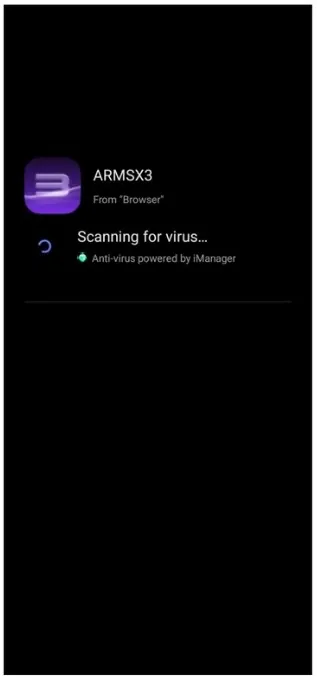
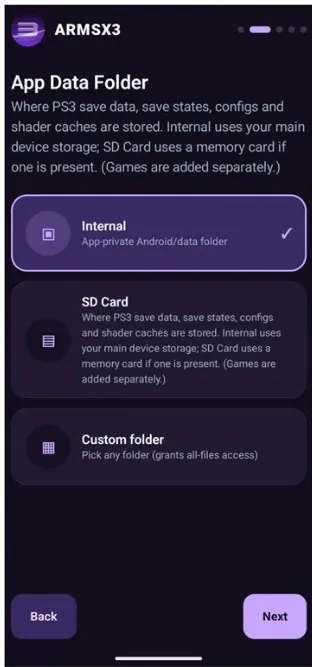
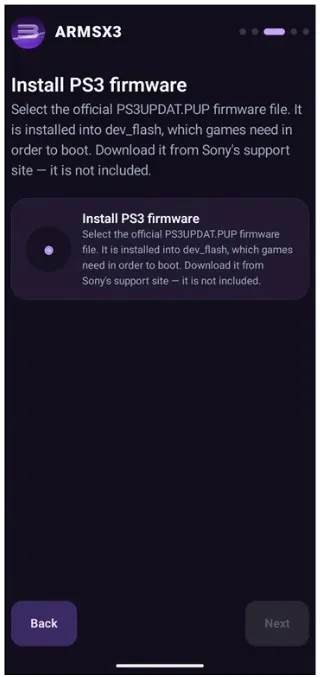
- Add PS3 Firmware: ArmSX3 needs official PS3 system software to work. Download the firmware from Sony’s official PlayStation website, then select the firmware file in ArmSX3.
- Choose Storage: Select where you want ArmSX3 to save its settings and other data. The default option is fine for most users.
- Add Your Games Folder: Select the folder containing your legally owned PS3 game backups.
- Allow Storage Access: Give ArmSX3 permission to access the folder so it can find your game files.
- Start Playing: Once everything is set up, your games should appear in the library. Select a supported game to start playing. Keep in mind that compatibility is still limited because ArmSX3 is in early development.
ARMSX3 vs Other PS3 Emulators for Android
| Emulator | Approach | Status |
|---|---|---|
| ArmSX3 | Direct port tracking RPCS3 upstream, Arm64-focused | Early alpha, proof of concept |
| aPS3e | Independent Android PS3 emulation project | More established, still limited compatibility |
| RPCSX-UI Android | RPCS3-based Android front end | Actively developed, mixed compatibility |
Pros and Cons
Pros
Cons
Troubleshooting
- Black Screen: Update to the latest build and try enabling Precise SPU Verification in Advanced Settings.
- Shader Stutter: Stuttering is normal during the first few minutes while shaders are being compiled. It should improve after the cache builds.
- Out of Memory: If you have 6–8 GB RAM, reduce compiler threads to 2 or 3.
- Missing Saves: Go to Settings > App > Import Save Data (.zip).
- Game Crashes: Update the emulator and try removing custom GPU drivers or clearing the PPU cache.
Frequently Asked Questions
Conclusion
ARMSX3 is a promising PS3 emulator for Android and ARM devices. It is still in early development, so compatibility and performance are limited. If you have a powerful Android device, you can try it, but don’t expect every PS3 game to run smoothly yet.